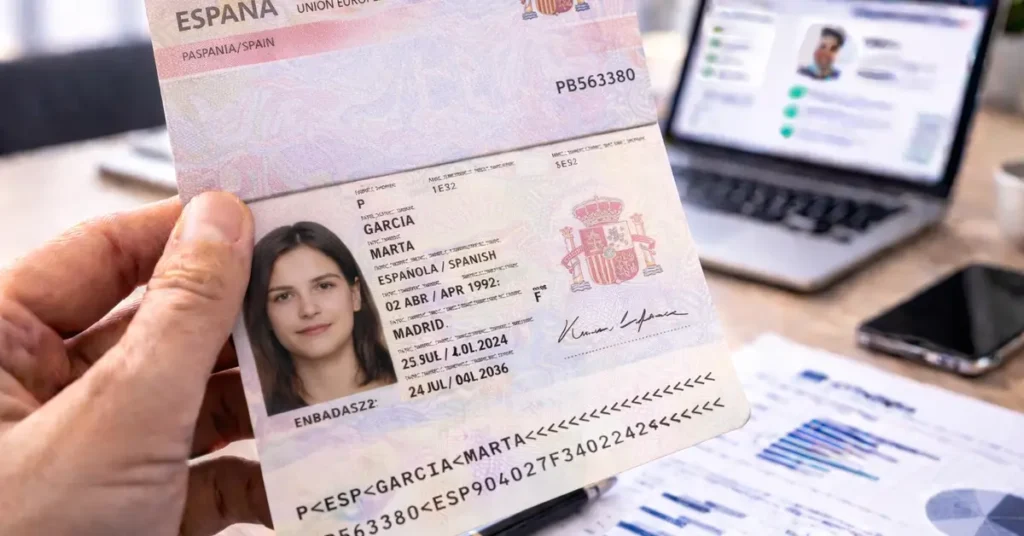
Article updated in February 2026 to reflect developments in Spanish passports and online document verification tools.
The Spanish passport is an official document widely used as proof of identity in many contexts: KYC checks, international travel, administrative procedures, digital platforms, or banking processes.
Like any identity document, it may nevertheless be subject to documentary fraud attempts: expired passports, visual alterations, inconsistencies between visible information and the MRZ, or tampering with security features.
How can you verify a Spanish passport online and ensure that the document presented is authentic?
The answer is provided in this guide through 4 essential verification checks.
Need more information on how to verify the authenticity of your ID documents ? Check out our comprehensive guide to verifying ID documents, which includes all the resources available !
Check 0: automatic online verification of the Spanish passport
Before any visual inspection, it is now possible to perform an initial automatic verification using a simple image of the passport.
This step notably allows:
- automatic reading of the MRZ
- validation of check digits
- consistency checks across fields (name, date of birth, sex, nationality, document number, expiration date)
- detection of common data entry errors or inconsistencies
⚠️ There is no public database allowing official validation of a Spanish passport.
Online verification therefore relies on document analysis and must be complemented by a visual inspection of security features.
Check 1: overall appearance of the Spanish passport
When access to the original document is possible, the first step is to examine the overall condition of the passport.
The document must show no signs of cutting, delamination, gluing, overprinting, or visible alteration.
Particular attention should be paid to:
- the biographical data page
- the photo area
- the edges and binding of the booklet
- raised or embossed printed areas
Any signs of scratching, heating, partial replacement, or retouching should be considered a warning signal.
Check 2: cross-checking and consistency of information
The second step consists of verifying the consistency of the information visible on the passport and its correspondence with the data encoded in the MRZ.
Priority elements to cross-check include:
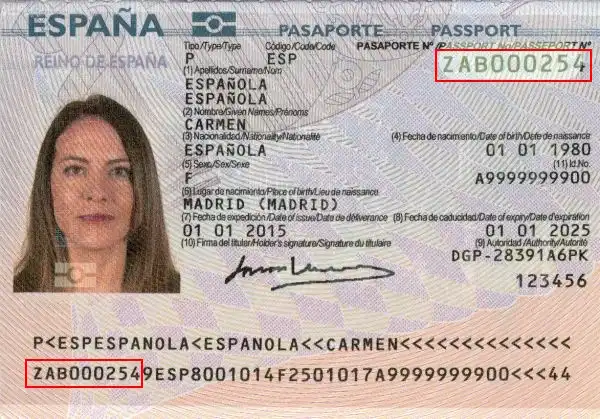
- Document number: visible on the identity page and in the second MRZ line
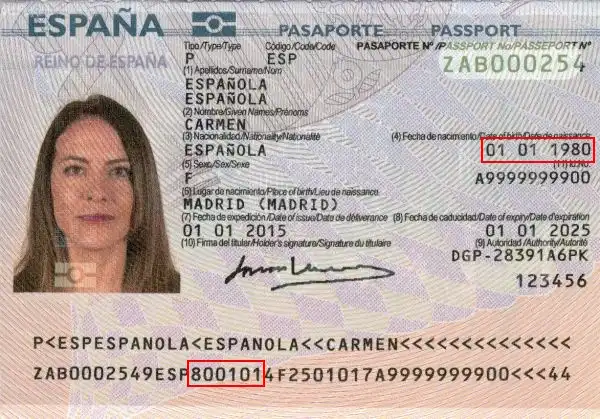
- Date of birth: shown on the passport and in the MRZ (YYMMDD format)
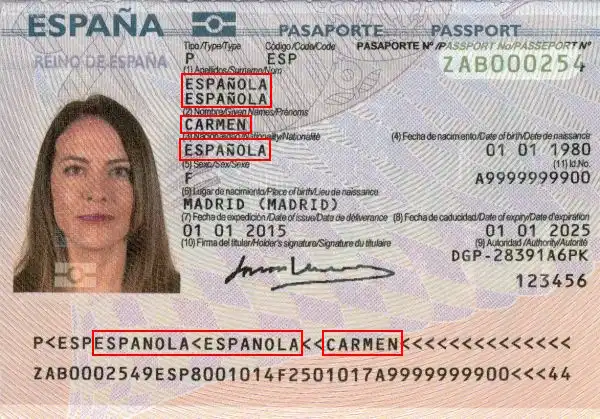
- Surname and given name(s): visible on the document and in the first MRZ line
- Holder’s sex: indicated by “M” or “F”, visible on the passport and in the MRZ
- Expiration date: present on the identity page and in the MRZ
- Issuing country and nationality: consistent with the ISO codes shown in the MRZ
Any discrepancy, even minor, between the visible fields and the MRZ should be treated as a warning sign requiring further examination.
Document Number
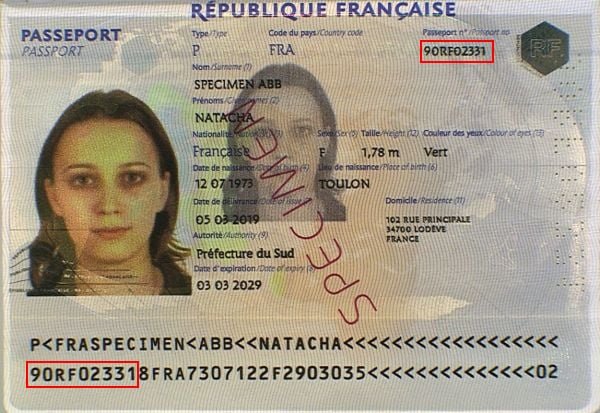
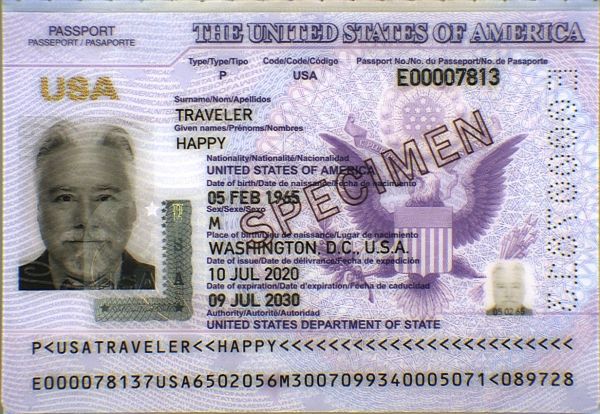
The document number can be found in two different places: top right on the front, and at the start of the second line of the MRZ.
Both must be identical:
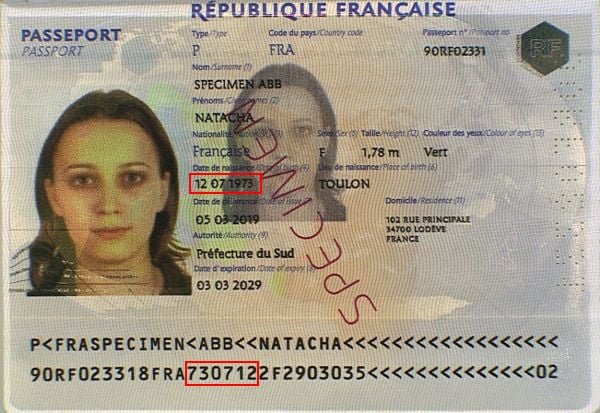
Date of Birth
The holder’s date of birth can also be found in two distinct places: in the middle of the front and in the middle of the second MRZ line in the format YYMMDD:
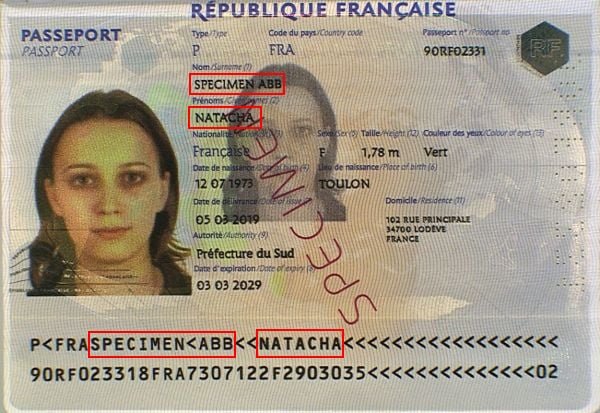
Surname and Given Names
Similarly, the surname and given names can be found on the document and in the first MRZ line:
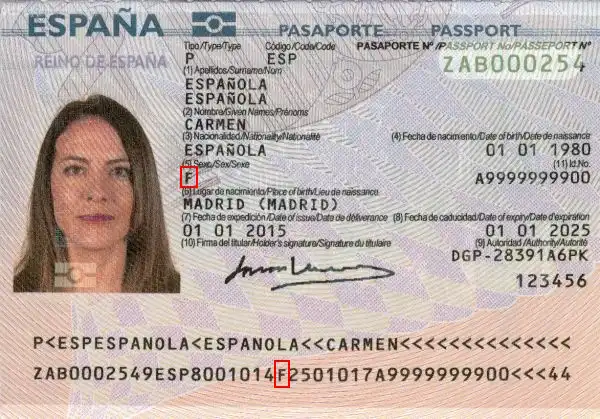
Holder’s Gender
The holder’s gender is indicated by “M” for male and “F” for female. This information is found on the front and in the second MRZ line:
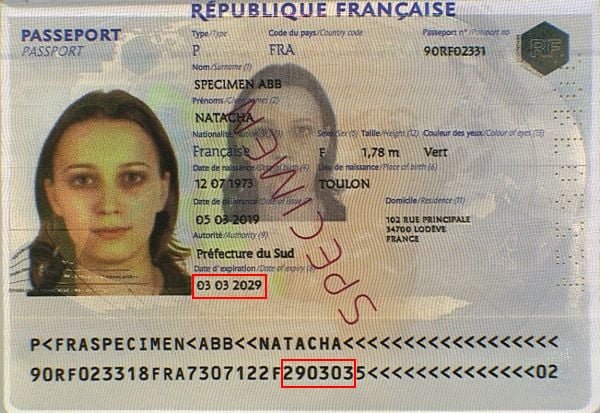
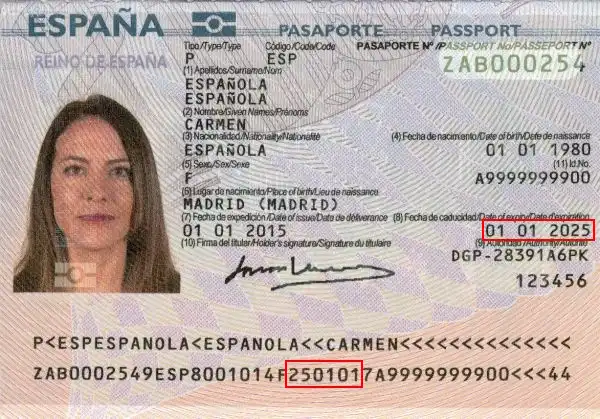
Document Expiry Date
Another element present twice on the document is the expiration date, found on the front and in the second MRZ line in the YYMMDD format:
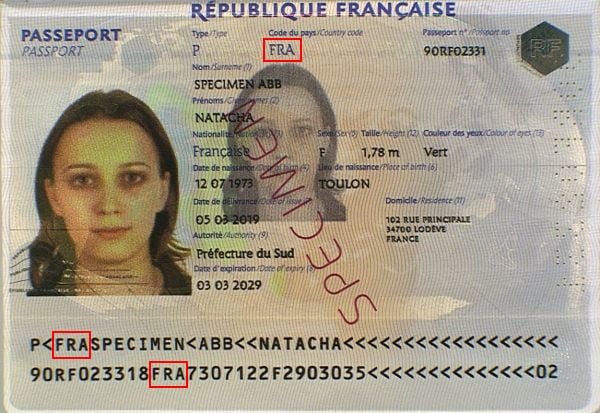
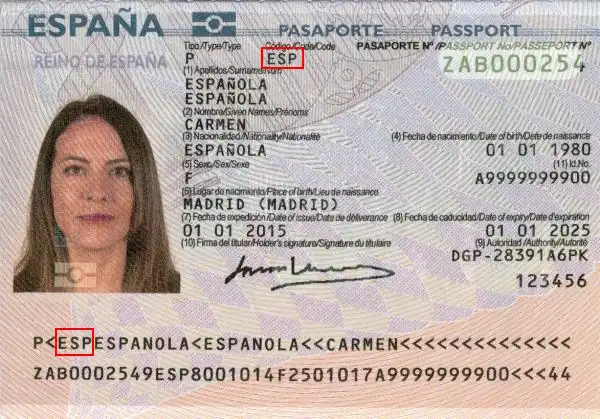
Issuing Country
The issuing country can be found in two places on the document: at the top of the front and at the start of the first MRZ line.
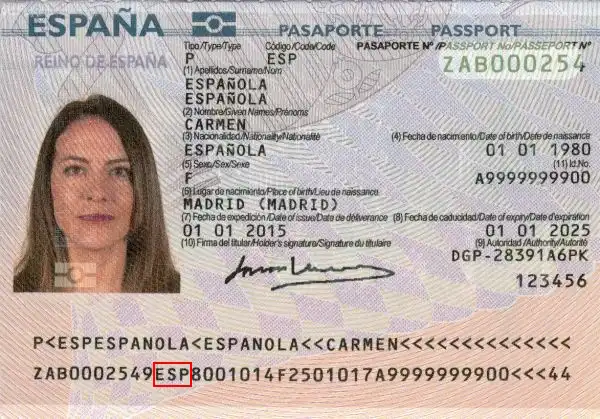
Nationality
The holder’s nationality can be found in the second MRZ line in ISO 3166-1 format:
Individuals, do you occasionally need to verify one or more identity documents ?
Professionals, do you need to integrate proof of identity validation into one of your business processes, including all European identity cards and global passports ?
Check 3: MRZ and check digit verification
The Spanish passport features a two-line MRZ that complies with ICAO standards.
The MRZ contains the main document information in a standardized format and includes five check digits, designed to detect reading errors and many forms of forgery.
MRZ analysis allows you to:
- verify the document structure
- mathematically validate the encoded data
- detect transcription errors or inconsistencies
The check digits are based on the standard ICAO algorithm using fixed weightings (7, 3, and 1), making this verification reliable, fast, and easy to automate.
Structure of the Spanish Passport MRZ
First Line

- Document Type: 2 characters, code indicating the type of document, represented by the letters “P<“.
- Issuing Country: 3 characters, the ISO 3166-1 alpha-3 code of the issuing country.
- Surname(s): the holder’s surname(s), separated by a “<” character.
- Given name(s): the holder’s given name(s), separated from the surname by two “<” characters and separated between them by a “<” character.
Second Line

- Document Number: 9 characters, the passport number printed on the document.
- Check Digit: 1 character, check digit of the document number.
- Nationality: 3 characters, holder’s nationality.
- Date of Birth: 6 digits, holder’s date of birth in YYMMDD format.
- Check Digit: 1 character, check digit of the date of birth.
- Gender: 1 character, holder’s gender (“M” or “F”).
- Expiration Date: 6 digits, passport expiration date in YYMMDD format.
- Personal Number: 11 characters, holder’s personal number.
- Check Digit: 1 character, check digit of the personal number.
- Check Digit: 1 character, check digit of the concatenation of characters from line 2 positions 44-54, 57-64, and 65-87.
Verify a Spanish Passport Using the MRZ Security Keys
A Spanish passport has 5 check digits (or security keys) that validate the preceding information.
They help prevent transcription errors or intentional/unintentional modifications.
How Does the Algorithm Work?
The algorithm used to create and validate the check digits is common to all identity documents: characters have a weight, which is multiplied by a factor depending on their position in the string (7, 3, and 1).
Digits have their numeric value (“0” is 0, “1” is 1, up to “9” which is 9), the chevron “<” also has a value of 0, while letters start at 10 for “A”, 11 for “B”, up to 35 for “Z”.
Example
Let’s take as an example the check digit for the date of birth from the specimen above.
The character string to validate is: “800101”.
To calculate the check digit, proceed as follows:
– “8” has a value of 8 and is in the first position, so multiply by 7: 8 * 7 = 56
– “0” has a value of 0 and is in the second position, so multiply by 3: 0 * 3 = 0, add to previous 56, total 0 + 56 = 56.
– “0” has a value of 0 and is in the third position, so multiply by 1: 0 * 1 = 0, add to previous 56, total 0 + 56 = 56.
– “1” * 7 = 7 and 7 + 56 = 63
– “0” * 3 = 0 and 0 + 63 = 63
– “1” * 1 = 1 and 1 + 63 = 64
The total is 64, from which we take modulo 10 (the remainder of the Euclidean division by 10), keeping only the last digit, which is “4”.
Our check digit is therefore valid because 4 appears on the document!
Check 4: verification of physical security features
This final step aims to confirm the material authenticity of the Spanish passport.
It complements document analysis by examining security features that are difficult to reproduce, including:
- holographic films and security devices
- watermarks and security films
- secondary “ghost” image
- secure printing, microtext, and iris printing
- optically variable inks (OVI)
- elements visible only under ultraviolet (UV) light
Some of these features can be checked with the naked eye, while others require specialized equipment.
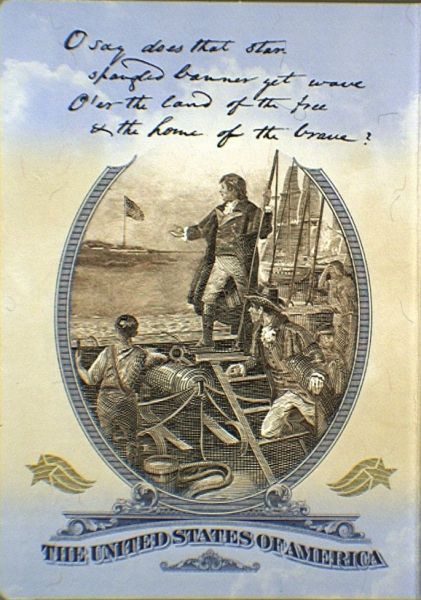
Inside Front Cover (Beginning of the Passport)
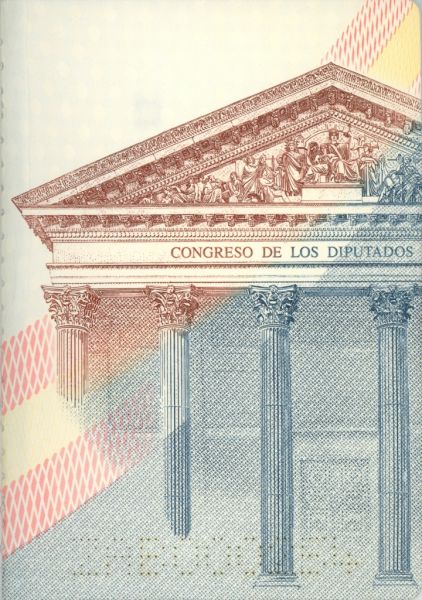
Inside Back Cover (End of the Passport)
Biographical Data Page
Watermark
Protects vital information (photo, MRZ); the film secures the photo and reveals any attempt of scraping.

Security Film
National pictograms & micro-letters visible from different angles.
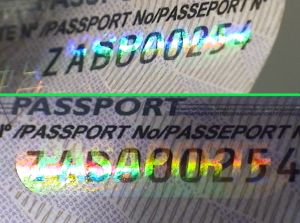

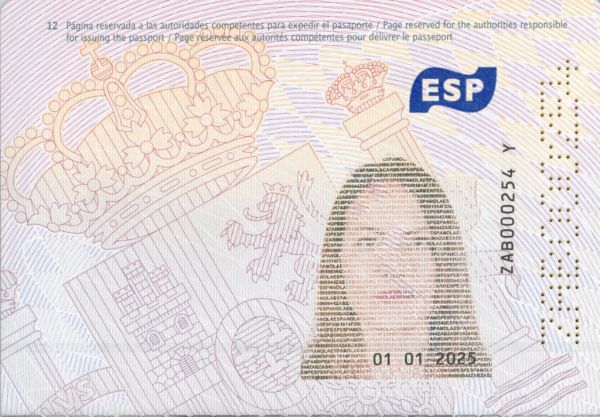
Inside Page
Iris printing makes faithful color photocopying impossible.
The ghost image links the identity and the page.
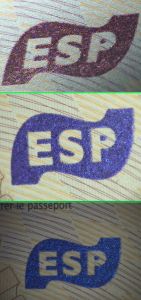
Printing Process
The color-shifting OVI is a premium feature difficult to replicate.
Conclusion
You now have a structured method to verify a Spanish passport online: MRZ analysis, cross-checking of information, followed by visual inspection of security features.
Even without specialized equipment, this combined approach already makes it possible to detect a large proportion of common document fraud cases.
To go further, it is also possible to use an online document verification solution.
For example, TrustDocHub allows automatic verification of a Spanish passport from an image, with results displayed directly within the application.
Individuals, do you occasionally need to verify one or more identity documents ?
Professionals, do you need to integrate proof of identity validation into one of your business processes, including all European identity cards and global passports ?