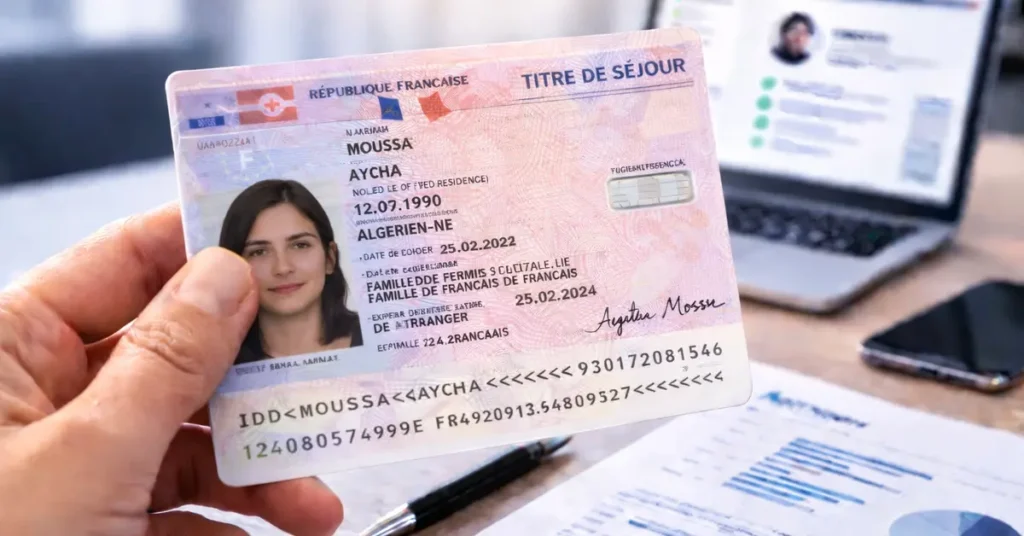
Article updated in February 2026 to reflect the latest developments in French residence permits and online verification tools.
Biometric residence permits currently used in France have been in circulation since 2020 and incorporate multiple physical and digital security features.
In 2026, it is now possible to perform an initial online verification using automatic MRZ reading, assisted document analysis, and cross-checking of key information.
Verifying a person’s identity remains essential across many industries to prevent fraud and identity theft.
How can you verify a French residence permit and ensure that the presented document is authentic? Find out in this updated guide.
Need more information on how to verify the authenticity of your ID documents ? Check out our comprehensive guide to verifying ID documents, which includes all the resources available !
Check 0: automatic online verification of French residence permits
Before any visual inspection of the document, it is now possible to carry out an initial automated online verification of a French residence permit.
This step typically includes:
– automatic MRZ reading
– validation of check digits
– consistency checks of fields (name, date of birth, expiration date, AGDREF number, nationality)
– detection of common input errors or inconsistencies
– generation of a timestamped PDF report
Some platforms such as TrustDocHub offer this type of automated verification, including MRZ reading, check-digit validation, and PDF report generation, directly from a web application.
This initial analysis does not replace a thorough visual inspection, but it helps quickly rule out many cases of fraud or error.
Check 1: General Appearance for Verifying a French Residence Permit Online
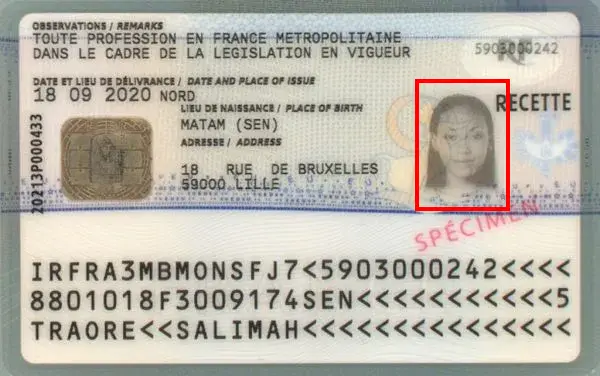
The first step when verifying a French residence permit or residence card online—when you can access the original document—is to examine its overall appearance: there should be no signs of cutting, peeling, or any modification/correction.
Pay close attention especially around and on the photo.
The residence permit / residence card is in ID-1 format, the size of a bank card, similar to, for example, the new driver’s license.
Check 2: Read, Cross-Check, and Verify Numbers and Information on the French Residence Permit / France Residence Card
The second step in verifying a French residence permit online is to check the consistency of the information on the document.
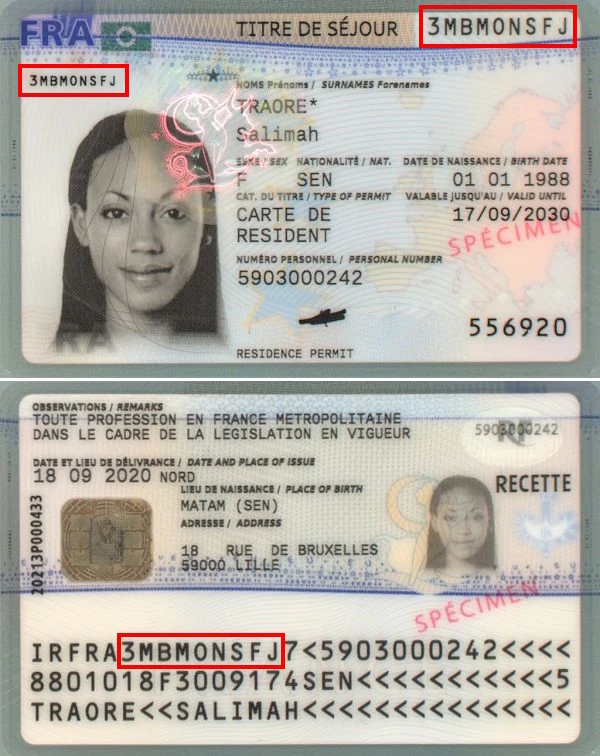
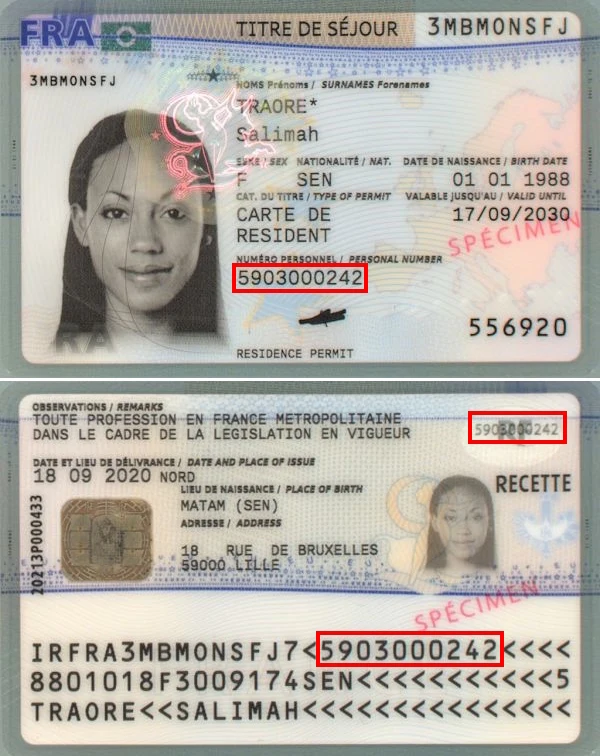
Residence Permit Number
The document number can be found in three different places: top right on the front, left on the front, and in the first line of the MRZ band.
All three must be identical:

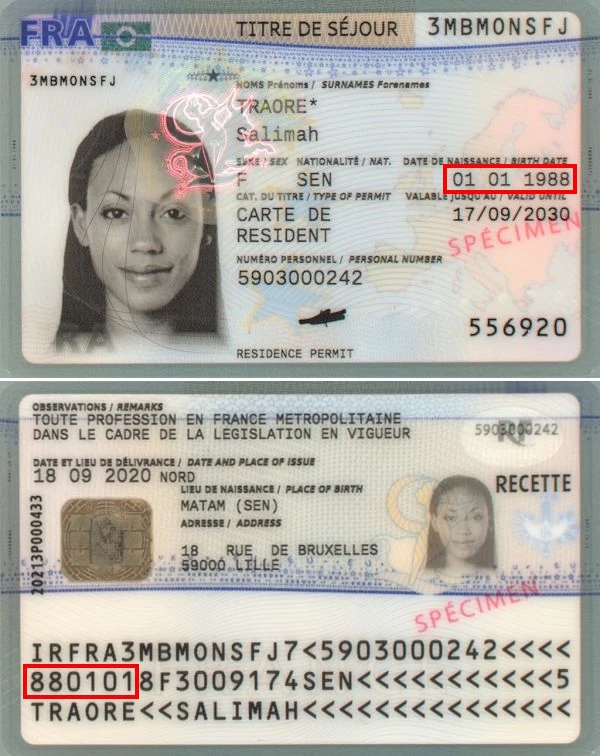
Date of Birth
The holder’s date of birth can also be found in two distinct places: center right on the front and at the beginning of the second MRZ line in YYMMDD format:

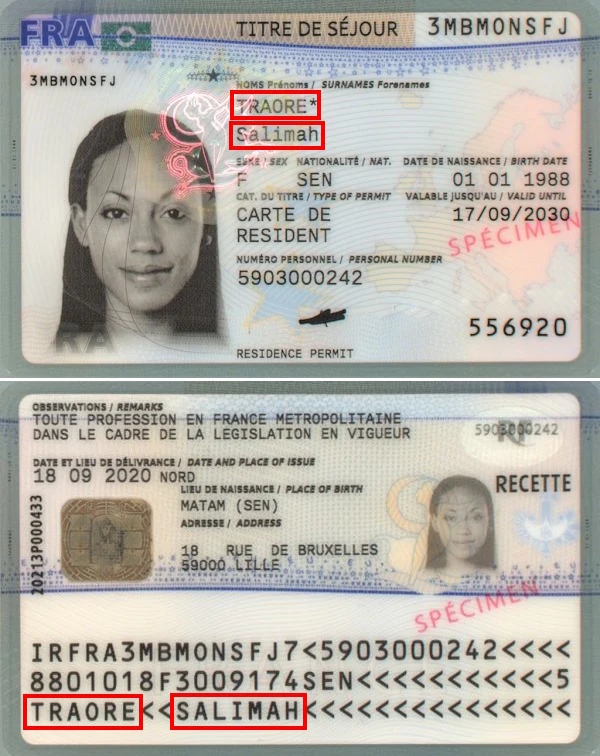
Surname and First Name(s)
Similarly for surname and first names, which can be found on the front of the card and in the third line of the MRZ band:

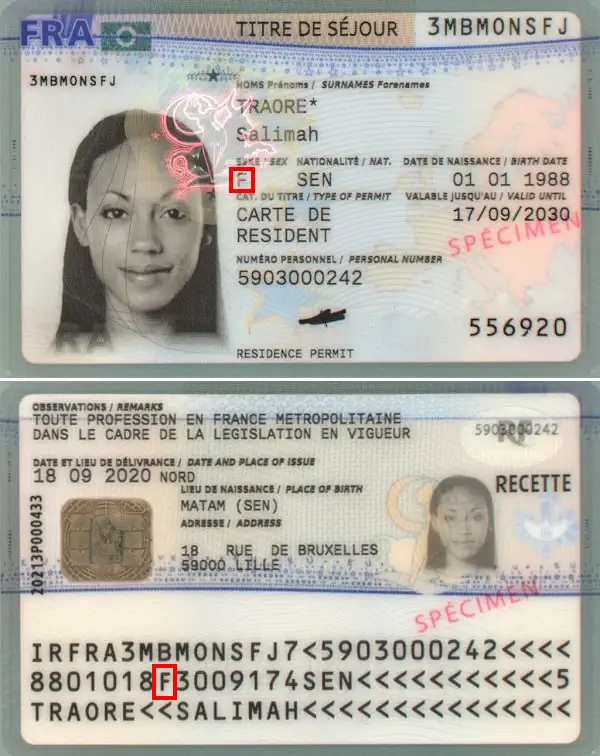
Holder’s Gender
The holder’s gender is symbolized by “M” for male and “F” for female. This information is found on the front and in the second line of the MRZ band:
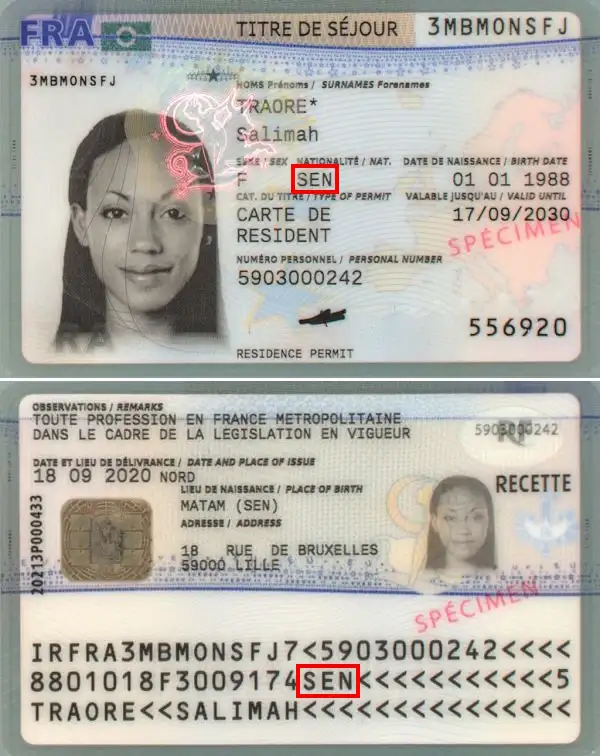
Holder’s Nationality
The holder’s nationality can be found in ISO 3166-1 format on the front of the card and in the second line of the MRZ band:
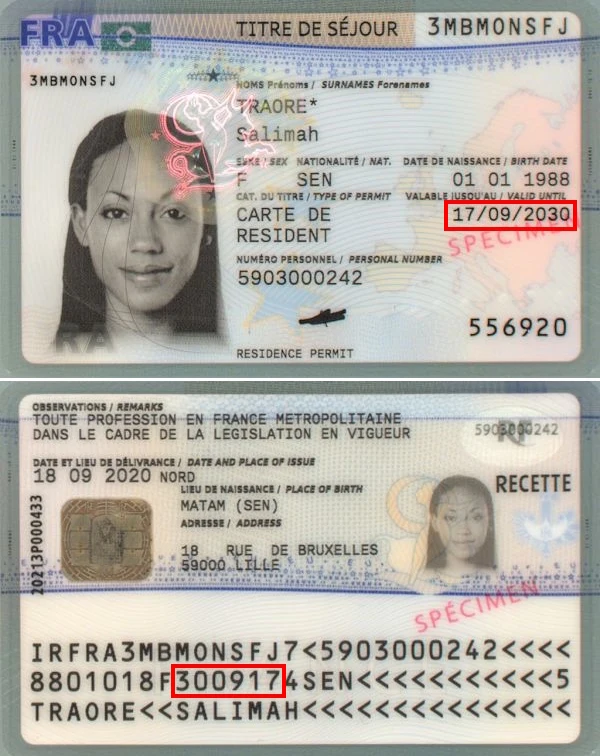
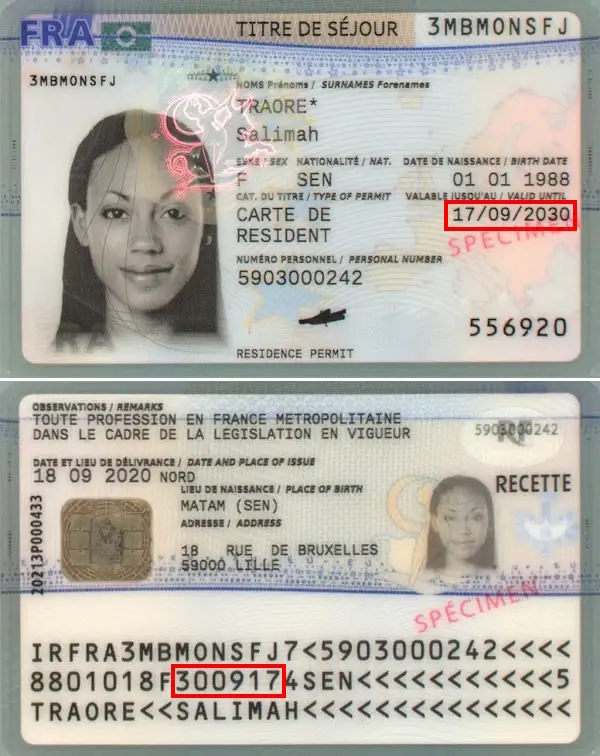
Expiration Date of the French Residence Permit
Another element present twice on the card: the expiration date, found on the front and in the second MRZ line in YYMMDD format:
AGDREF Number
What is the AGDREF Number?
When a foreign national arrives in France, an AGDREF number is automatically assigned. This 10-digit number simplifies the management of official document requests and secures all administrative procedures for the individual. AGDREF stands for “Application de Gestion des Dossiers des Ressortissants Étrangers en France” (Management Application for Foreign Nationals’ Files in France). It ensures the rights of individuals legally residing and fights against illegal stays.
Where to Find It on a French Residence Permit / Residence Card?
The AGDREF number can be found in three different places on a residence permit / residence card: center bottom on the front, as an overlay at top left on the back, and in the first line of the MRZ band:

Individuals, do you occasionally need to verify one or more identity documents ?
Professionals, do you need to integrate proof of identity validation into one of your business processes, including all European identity cards and global passports ?
Check 3: Verify a French Residence Permit Using Its MRZ Band
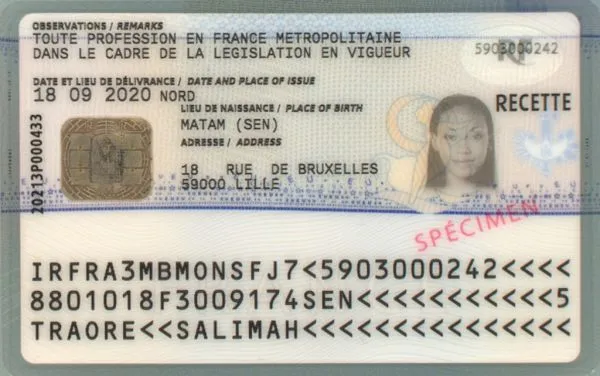
The bottom part of the new French residence permit consists of three lines that reproduce the information on the card, with validation keys to avoid reading errors or forgeries.
Composition of the MRZ Band on the French Residence Permit
First Line

- Document Type: 2 characters, code indicating the document type, represented by the letters “IR”.
- Issuing Country: 3 characters, the ISO 3166-1 alpha-3 code of the issuing country.
- Card Number: 9 characters, unique card number.
- Check Digit: 1 character, check digit of the unique card number.
- Personal Number (AGDREF): 10 characters, holder’s personal number.
- End of Line: chevrons “<” used to fill the line.
Second Line

- Date of Birth: 6 characters, year, month and day in YYMMDD format.
- Check Digit: 1 character, check digit for the date of birth.
- Gender: 1 character, “M” or “F”.
- Expiration Date: 6 digits, card expiration date in YYMMDD format.
- Check Digit: 1 character, check digit for the expiration date.
- Country Code: 3 characters, ISO 3166-1 alpha-3 code of the holder’s nationality.
- Separator: 11 characters, “<“.
- Check Digit: 1 character, check digit of the concatenation of characters from line 1 positions 6-15, line 2 positions 1-7, and line 2 positions 9-15.
Third Line

- Holder’s Name and First Names: holder’s surname and first names, starting with the family name followed by the first name. The family name and first name are separated by two “<” characters. In case of compound family names, compound first names, or multiple first names, they are separated by the “<” character. Spaces and apostrophes are replaced by the “<” character. The name is truncated to 30 characters if necessary, and any accents on letters are removed. The line is then filled with the “<” character.
Verify a French Residence Permit Using the MRZ Line Check Digits
A French residence permit contains 4 check digits (or security keys) that validate the preceding information.
They help prevent transcription errors or intentional/unintentional modifications.
How Does the Algorithm Work?
The algorithm used to create and validate check digits is common to all identity documents: characters have weights multiplied by factors depending on their position in the string (7, 3, and 1).
Digits have their numeric value (“0” = 0, “1” = 1, … “9” = 9), the chevron “<” also has a value of 0, while letters start at 10 for “A”, 11 for “B” up to 35 for “Z”.
Example
Let’s take as an example the check digit for the date of birth in the specimen above.
The string to validate is: “880101”.
To calculate the check digit, we proceed as follows:
– “8” has a value of 8 and is in the first position, multiply by 7: 8 * 7 = 56
– “8” has a value of 8 and is in the second position, multiply by 3: 8 * 3 = 24, add to previous 56: 24 + 56 = 80.
– 0 has a weight of 0 and is in the third position, multiply by 1: 0 * 1 = 0, add to 80: 0 + 80 = 80.
– 1 * 7 = 7 and 7 + 80 = 87
– 0 * 3 = 0 and 0 + 87 = 87
– 1 * 1 = 1 and 1 + 87 = 88
We get a total of 88, from which we extract modulo 10 (the remainder of division by 10), which means keeping only the last digit: “8”.
Our check digit is therefore valid because 8 appears on the document!
Check 4: Verify a French Residence Permit with Its Physical Security Features
An identity document includes various features that help validate its authenticity.
This is the final step for verifying a French residence permit online, as it is the most detailed.
Holographic Device
A next-generation holographic device is used to protect the bull visible on the front of the residence permit.
It changes color depending on the orientation:

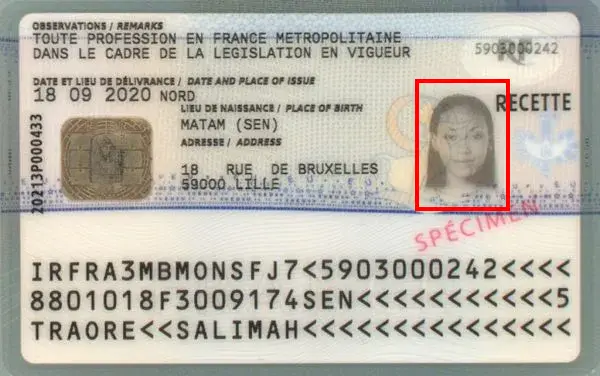
Secondary Photo on Residence Permit
A secondary or “ghost” black and white photo is visible on the back of the card on the right side:
Electronic Chip
An electronic chip is embedded in the permit and allows contactless reading of the information present on the document.
Again, it is possible to verify a French residence permit online by cross-checking information from the chip with those on the card.
It can be found on the back of the document:

Multiple Laser Image
The “RF” symbol and the AGDREF number are repeated on the back of the permit.
The image changes depending on the orientation of the card.
This feature is located on the back, at the top right of the permit:

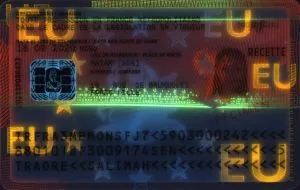
Ultraviolet Check
Some elements are visible only under ultraviolet light, but this requires specialized equipment (so it is not suitable for online verification of a French residence permit).
Front of the permit under ultraviolet light:

Back of the permit under ultraviolet light:

Conclusion
You now have all the keys to verify a French residence permit online and assess its authenticity.
No specialized equipment is required: with a bit of vigilance and time, you can already avoid most of the fraud encountered in everyday situations.
To go further, you can also use an online document verification solution to automate these checks. For example, TrustDocHub allows you to verify a French residence permit in just a few seconds from an image, with results available directly in the application and as a PDF report.
Individuals, do you occasionally need to verify one or more identity documents ?
Professionals, do you need to integrate proof of identity validation into one of your business processes, including all European identity cards and global passports ?