
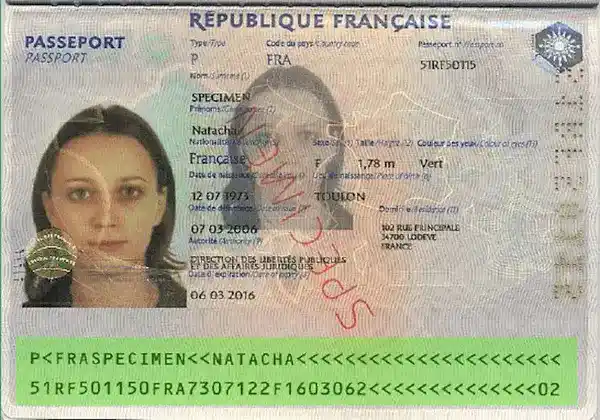
How to verify the authenticity of a French passport online?
Many professional and personal processes today require you to verify an identity card online: recruitment, real estate rentals, KYC, customer onboarding, and more.
When documents are sent as scans or photos, it becomes difficult to distinguish an authentic ID from a modified or artificially generated document.
Our solution allows you to automatically verify an identity card from a simple image or PDF, using MRZ reading, check-digit validation, and data consistency analysis.
In just a few seconds, you receive a reliable result and a detailed report, helping you speed up your workflows while reducing fraud risks.
Which elements are validated during the French passport validity check at the “Standard” level?
Full MRZ reading and validation
We automatically perform OCR reading of the MRZ zone, then verify and validate all extracted information along with the associated security check digits.
This makes it possible to confirm data consistency (document number, dates, identity) and quickly detect errors or attempted tampering.
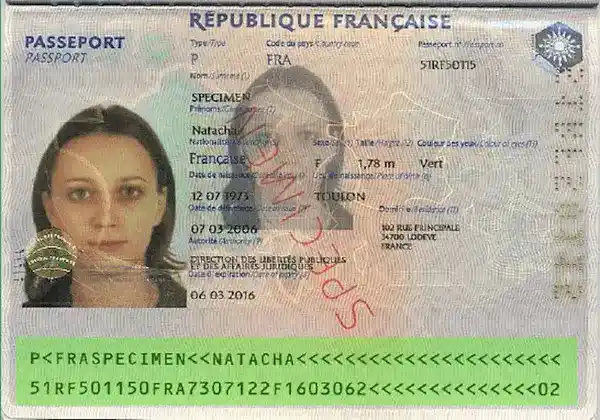
Which elements are validated during the French passport validity check at the “Plus” level?
The French passport document number
The document number corresponds to an official pattern from the ministry : we verify that this is indeed the case to validate it.

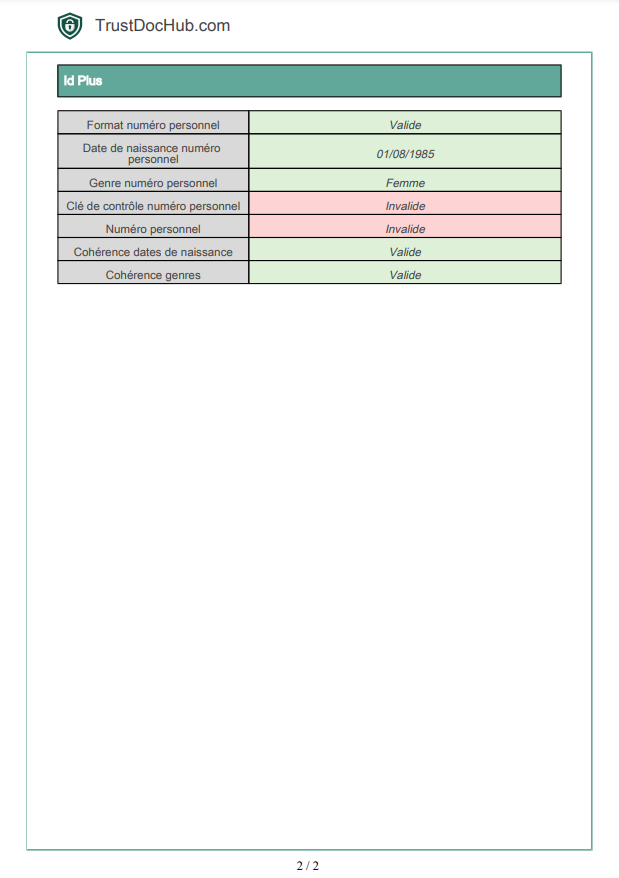
Enriched data with the “Id Plus” section
With the Plus analysis level, your identity verification is enriched with additional information grouped in a dedicated “Id Plus” section, available both in the web application and in PDF / JSON / XML reports.
This advanced analysis cross-checks MRZ data with the document’s personal information, providing a more complete view of the verified identity and strengthening the detection of inconsistencies.
Web app “Id Plus” section
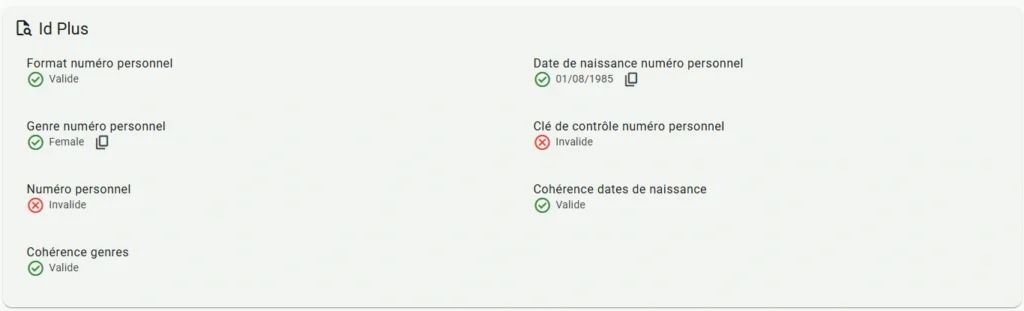
PDF report “Id Plus” section
Advanced Forensic Analysis with the “Pro” level
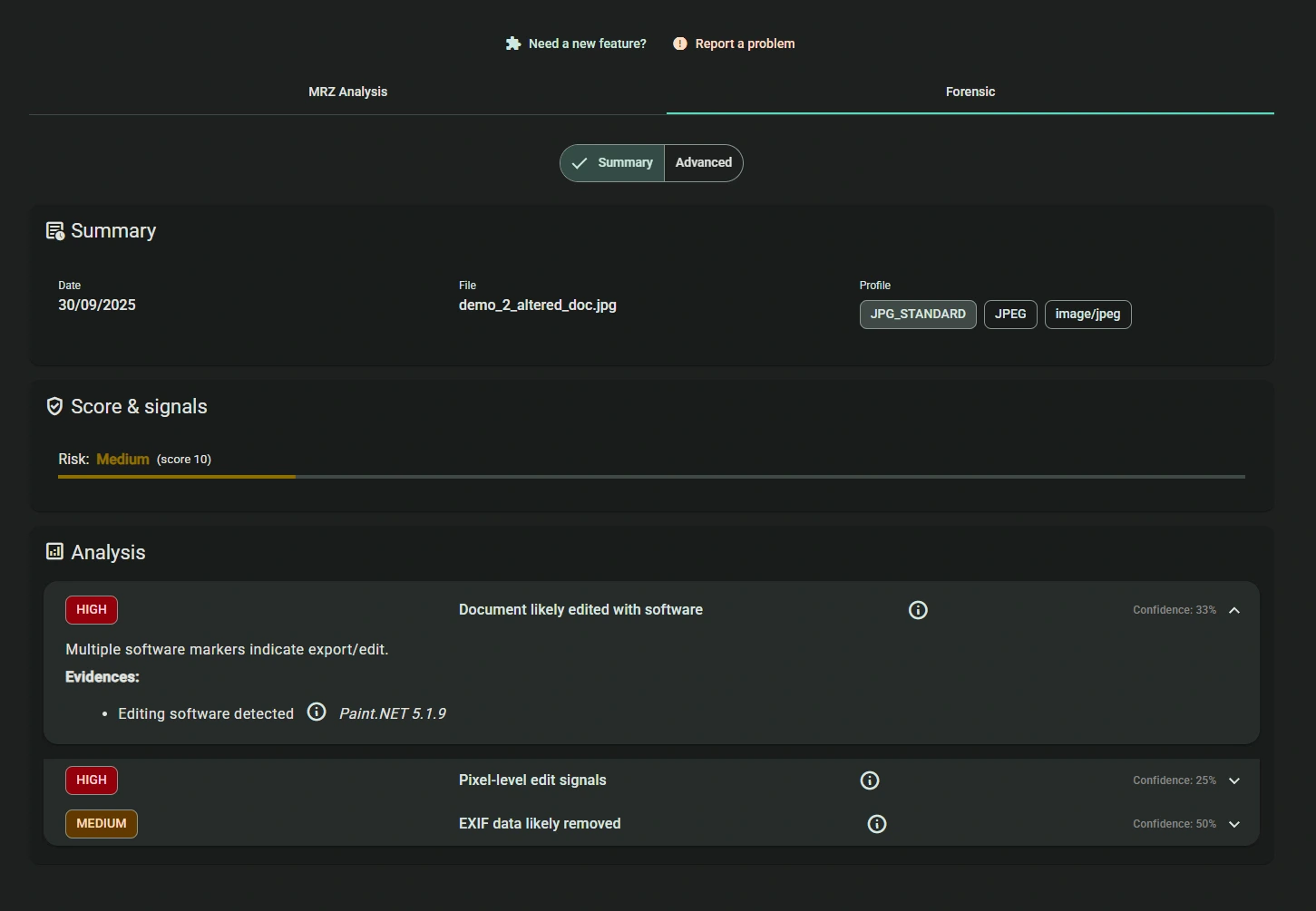
With the Pro analysis level, verification goes beyond MRZ data: the system also analyzes the uploaded file itself to detect manipulations invisible to the naked eye.
This forensic analysis includes in particular:
– extraction and analysis of file metadata
– document integrity verification
– detection of modified documents or files generated from templates (Photoshop, recomposed scans, etc.)
Even if the MRZ is valid, altered or artificially created documents are identified thanks to these advanced checks.
Forensic analysis runs in parallel with MRZ reading, and results are available within seconds in the web application as well as in the detailed report.
All common formats are supported: images (JPG, PNG, WebP…) and PDF documents.
Results are grouped in a dedicated “Forensic” tab, with detection scenarios and integrity indicators, helping you quickly identify document fraud attempts.
The “Forensics” tab of the detailed Pro-level report
Video demonstration of the Forensic analysis for the “Pro” level
How does the French passport validity verification work online?
After your purchase is confirmed or after you sign up, you will receive an email with your login details to access our identity verification web app (please check your spam folder if needed).
In just a few simple steps, you can verify an ID card or any other official document directly online.
1. Access the web app
Log in to your secure workspace using the credentials you received by email.
From your dashboard, select “Verify an identity document”.
2. Upload your document
Upload the scan or photo of the identity document (front/back), in an image format (JPG, PNG, WebP…) or PDF.
No preparation is required: the system automatically detects the document orientation as well as the MRZ area.
3. Automatic document analysis
The platform instantly performs:
– OCR reading of the MRZ
– validation of security check digits
– data consistency checks (document number, dates, identity…)
– forensic file analysis (Pro level)
This step quickly detects inconsistencies, input errors, and potential document fraud attempts.
4. Instant results and detailed report
Results are displayed immediately as a status (passed / failed), along with a complete report available in PDF, JSON, or XML.
Each field is detailed: recognized data, check digits, information consistency, and integrity indicators.
Reports remain available in your history and can be deleted at any time (privacy-friendly).
5. Credits and account management
Credits are deducted only when the MRZ is successfully detected.
You can check your balance at any time and subscribe to a plan that matches your analysis volume.
Example: verifying an identity document
The front and back of the ID card are shown in the video example below, but please note that only the back (with the MRZ) is required to analyze a document.
Support and guidance
Have a question or a specific need? Our support team is available by email or via the built-in help interface.
Additional resources (guides, FAQ, documentation) are also available to help you.
For professionals
Do you want to integrate identity document verification into your business workflows (KYC, onboarding, recruitment, compliance)?
We offer subscription plans tailored to professional needs, as well as a complete solution to analyze identity documents and PDF files through our web app.
Common use cases
Recruitment & onboarding
Quickly validate a candidate’s identity before signing a contract and reduce fraud risks.
Real estate rental
Verify the authenticity of documents provided by a tenant and secure your application files.
KYC & compliance
Automate identity verification to meet regulatory requirements while speeding up your checks.
Signing up for an online service
Check users’ age and identity for sensitive platforms.
B2B relationships & partnerships
Secure your collaborations by validating the identity of legal representatives.
How are the results of the French passport validity analysis presented?
The analysis results are available for download from the identity suite history in PDF / JSON / XML formats:

What document formats are accepted?
You can submit your documents as jpg / jpeg / png images, or as PDFs.
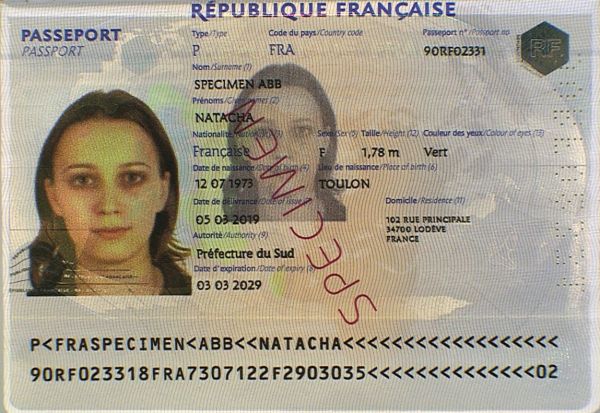
Scans/photos do not need to be cropped or edited: they are detected automatically during the French passport validity verification.
It is possible to send the front page with the MRZ band or the two relevant passport pages: the MRZ band will be detected correctly and recognition will proceed without problem.
The same applies for tilt: scans can be slightly tilted or misoriented and will still be properly recognized by our service!
Example:
Am I charged if MRZ passport information is not extracted correctly during French passport validity verification?
No. You are never charged as long as the MRZ of the Romanian ID card has not been correctly detected and analyzed.
Billing applies only to successfully recognized documents — meaning when the data can be automatically extracted, validated, and verified.
If the photo quality is low or some characters are not properly detected, you can manually correct the fields to obtain a reliable analysis — with no credit loss.
👉 Result: zero risk of unnecessary charges, and a verification process you can always rely on.
Discover the full workflow in the video below:
How does French passport validity verification work?
An automatic reading zone, or optical reading zone, is an area on an official document reserved for reading, identification, and validation of that document.
Thus, documents such as passports, national identity cards, residence permits, and driving licenses may or must contain, depending on the country and document versions, an optical reading zone.
It is located at the bottom of identity documents: it contains all the information present on the document with security keys allowing to verify their authenticity and that they have not been altered.
The information found there varies depending on the type of document.
How is the MRZ band of the French passport composed?
Passports have two lines of text, each containing alphanumeric characters.
Why use the MRZ band of a passport to detect fraud?
The data found there are passport data protected by multiple validation keys, making modification difficult. Therefore, it is one of the verification tools used by airport aviation security to ensure identity documents have not been falsified.
What data is extracted from the French passport MRZ line?
The data extracted from the MRZ band are as follows:
- First line:

- Document Type: A code indicating the type of document, represented by the letter “P”.
- Type: One character for countries that distinguish between passport types.
- Country Code: Issuing country code of 3 characters in ISO3166 format.
- Name and given names: Name and given names of the person separated by two “<“ characters, then completed by “<“.
- Second line:

- Document Number: 9 alphanumeric characters.
- Check Digit: 1 numeric character, check digit of the document number.
- Nationality: 3 characters indicating nationality according to ISO 3166-1 alpha-3 standard.
- Date of Birth: 6 numeric characters (two-digit year, month and day in YYMMDD format).
- Check Digit: 1 numeric character, check digit of the date of birth.
- Gender: 1 character, “M” for male, “F” for female.
- Expiration Date: 6 numeric characters (two-digit year, month and day in YYMMDD format).
- Check Digit: 1 numeric character, check digit of the expiration date.
- Personal Number: 14 alphanumeric characters, used by some countries.
- Check Digit: 1 numeric character, check digit of the personal number (or “<” if only chevrons).
- Check Digit: 1 numeric character, overall check digit.
Personal data & privacy
Protecting your data is a top priority.
After downloading the report, you can immediately delete the analysis from your secure account history. This gives you full control over your documents and personal information.
By default, all data is automatically deleted after 3 months, in line with GDPR best practices.
Our platform is designed to ensure the confidentiality of uploaded documents and the security of all processing — whether for occasional or professional use.
👉 Find all details about personal data management on our dedicated page: Privacy Policy.
Terms and Conditions
Service usage terms, billing information, and your rights are detailed in our Terms and Conditions.
👉 View the full Terms and Conditions here: TrustDocHub T&C.



Allan H. –
very satisfied: verification is done in a few seconds
Robert K. –
Quick service, but the instructions could be clearer.
John G –
2€ for real ?!! Saved me an hour of work
Frank C. –
Really impressed with the speed and results of the analysis.
Fph –
Nice service, thanks !