
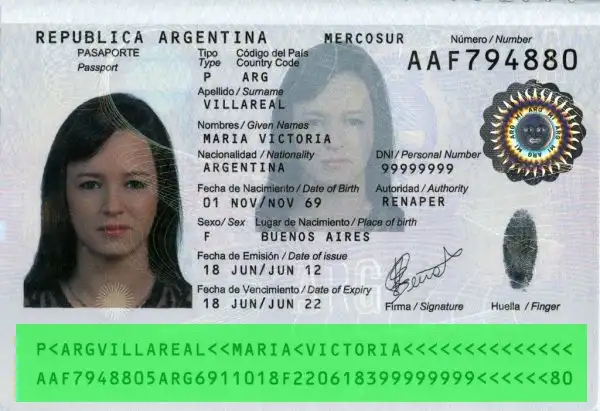
How to verify the authenticity of an Argentine passport online?
Many professional and personal processes today require you to verify an identity card online: recruitment, real estate rentals, KYC, customer onboarding, and more.
When documents are sent as scans or photos, it becomes difficult to distinguish an authentic ID from a modified or artificially generated document.
Our solution allows you to automatically verify an identity card from a simple image or PDF, using MRZ reading, check-digit validation, and data consistency analysis.
In just a few seconds, you receive a reliable result and a detailed report, helping you speed up your workflows while reducing fraud risks.
Which elements are validated during the validity check of an Argentine passport at the “Standard” level?
Full MRZ reading and validation
We automatically perform OCR reading of the MRZ zone, then verify and validate all extracted information along with the associated security check digits.
This makes it possible to confirm data consistency (document number, dates, identity) and quickly detect errors or attempted tampering.

Advanced Forensic Analysis with the “Pro” level
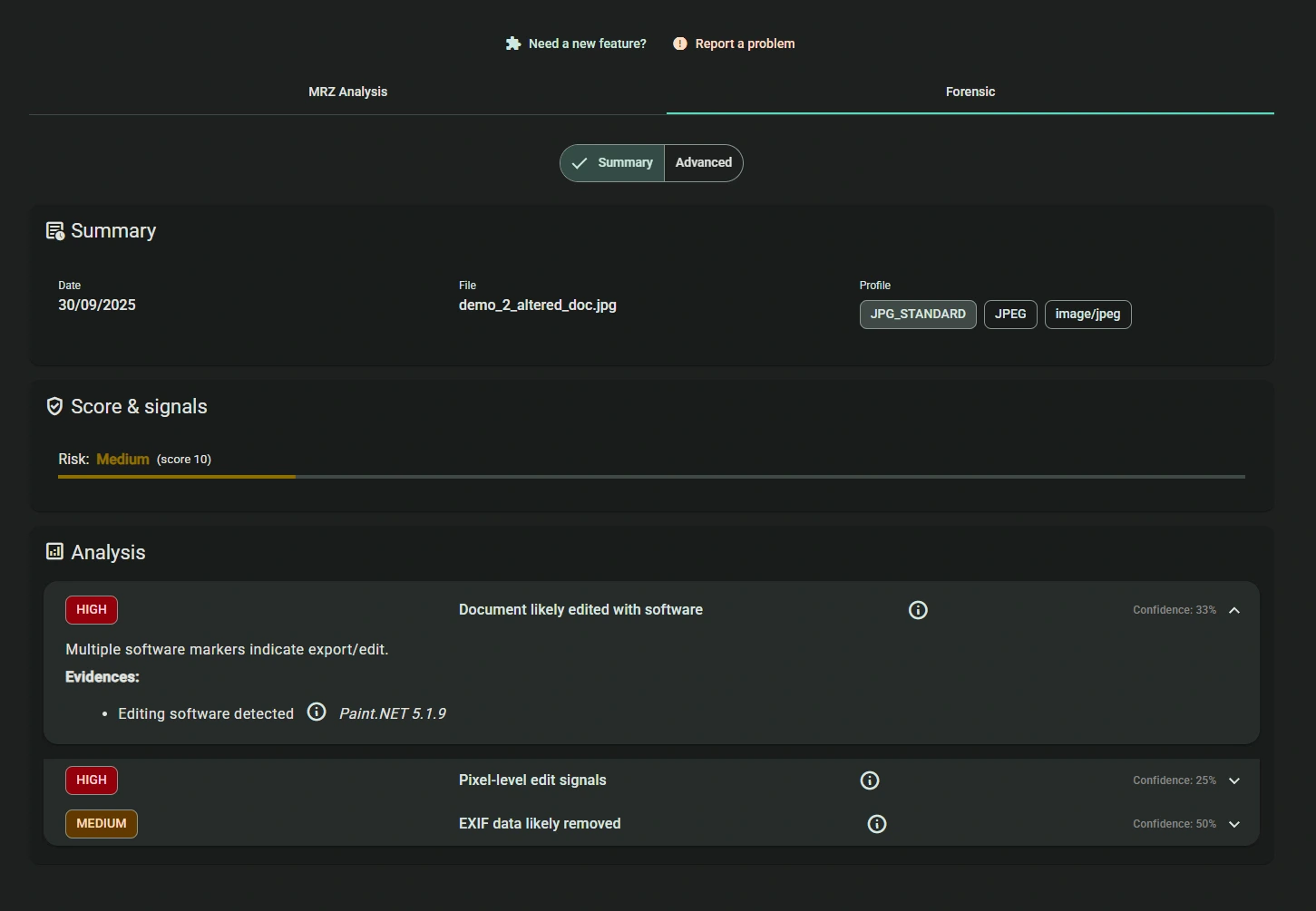
With the Pro analysis level, verification goes beyond MRZ data: the system also analyzes the uploaded file itself to detect manipulations invisible to the naked eye.
This forensic analysis includes in particular:
– extraction and analysis of file metadata
– document integrity verification
– detection of modified documents or files generated from templates (Photoshop, recomposed scans, etc.)
Even if the MRZ is valid, altered or artificially created documents are identified thanks to these advanced checks.
Forensic analysis runs in parallel with MRZ reading, and results are available within seconds in the web application as well as in the detailed report.
All common formats are supported: images (JPG, PNG, WebP…) and PDF documents.
Results are grouped in a dedicated “Forensic” tab, with detection scenarios and integrity indicators, helping you quickly identify document fraud attempts.
The “Forensics” tab of the detailed Pro-level report
Video demonstration of the Forensic analysis for the “Pro” level
How does the online Argentine passport validity verification work?
After your purchase is confirmed or after you sign up, you will receive an email with your login details to access our identity verification web app (please check your spam folder if needed).
In just a few simple steps, you can verify an ID card or any other official document directly online.
1. Access the web app
Log in to your secure workspace using the credentials you received by email.
From your dashboard, select “Verify an identity document”.
2. Upload your document
Upload the scan or photo of the identity document (front/back), in an image format (JPG, PNG, WebP…) or PDF.
No preparation is required: the system automatically detects the document orientation as well as the MRZ area.
3. Automatic document analysis
The platform instantly performs:
– OCR reading of the MRZ
– validation of security check digits
– data consistency checks (document number, dates, identity…)
– forensic file analysis (Pro level)
This step quickly detects inconsistencies, input errors, and potential document fraud attempts.
4. Instant results and detailed report
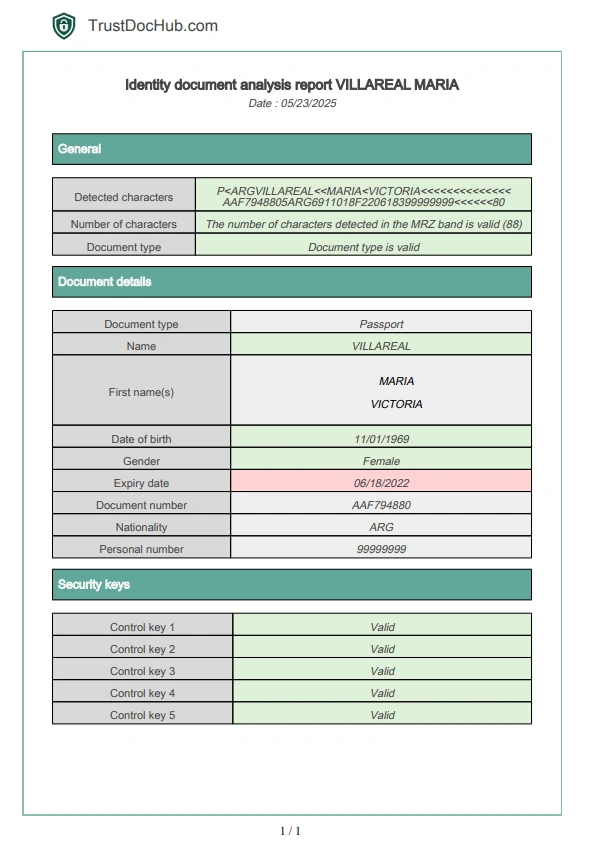
Results are displayed immediately as a status (passed / failed), along with a complete report available in PDF, JSON, or XML.
Each field is detailed: recognized data, check digits, information consistency, and integrity indicators.
Reports remain available in your history and can be deleted at any time (privacy-friendly).
5. Credits and account management
Credits are deducted only when the MRZ is successfully detected.
You can check your balance at any time and subscribe to a plan that matches your analysis volume.
Example: verifying an identity document
The front and back of the ID card are shown in the video example below, but please note that only the back (with the MRZ) is required to analyze a document.
Support and guidance
Have a question or a specific need? Our support team is available by email or via the built-in help interface.
Additional resources (guides, FAQ, documentation) are also available to help you.
For professionals
Do you want to integrate identity document verification into your business workflows (KYC, onboarding, recruitment, compliance)?
We offer subscription plans tailored to professional needs, as well as a complete solution to analyze identity documents and PDF files through our web app.
Common use cases
Recruitment & onboarding
Quickly validate a candidate’s identity before signing a contract and reduce fraud risks.
Real estate rental
Verify the authenticity of documents provided by a tenant and secure your application files.
KYC & compliance
Automate identity verification to meet regulatory requirements while speeding up your checks.
Signing up for an online service
Check users’ age and identity for sensitive platforms.
B2B relationships & partnerships
Secure your collaborations by validating the identity of legal representatives.
How are the results of the Argentine passport validity analysis presented?
The analysis results are available for download from the identity suite history in PDF / JSON / XML formats:
What document formats are accepted?
You can send your documents as jpg / jpeg / png images or as PDFs.
Scans/photos do not need to be cropped or edited: they are detected automatically.
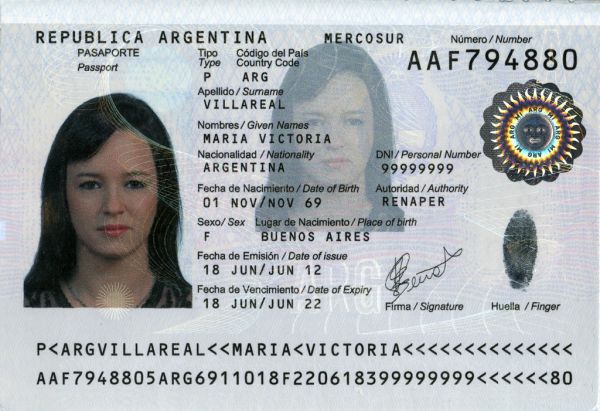
It is possible to send the front side with MRZ strip or both concerned passport pages: the Argentine passport MRZ strip will be detected properly and recognition will be done without any problem.
Also for tilt: scans can be a bit tilted or misoriented: they will be correctly recognized by our service!
Example:
Am I charged if the information is not correctly extracted from the Argentine passport validity verification?
No. You are never charged as long as the MRZ of the Romanian ID card has not been correctly detected and analyzed.
Billing applies only to successfully recognized documents — meaning when the data can be automatically extracted, validated, and verified.
If the photo quality is low or some characters are not properly detected, you can manually correct the fields to obtain a reliable analysis — with no credit loss.
👉 Result: zero risk of unnecessary charges, and a verification process you can always rely on.
Discover the full workflow in the video below:
How does the Argentine passport validity verification work?
An automatic reading zone, or optical reading zone, is an area on an official document reserved for reading, identifying, and validating this document.
Thus, documents such as passports, national identity cards, residence permits, driving licenses may or must contain, depending on the country and document versions, an optical reading zone.
It is located at the bottom part of identity documents: it contains all the information present on the document with security keys allowing to verify their authenticity and that they have not been modified.
The information found varies depending on the type of document.
How is the Argentine passport MRZ strip composed?
Passports have two lines of text, each containing alphanumeric characters.
Why use this method to detect fraud?
The data found there are passport data protected by multiple validation keys, making their modification complicated. It is therefore one of the verification tools used by airport aviation security to ensure that identity documents have not been forged.
What data are extracted from the Argentine passport MRZ line?
The data extracted from the MRZ strip are as follows:
- First line:

- Document Type: A code indicating the type of document, represented by the letter “P”.
- Type: a character for countries that distinguish between types of passports.
- Country Code: Issuing country code with 3 characters.
- Name and given names: Last name and first name separated by two “<“ characters, then completed by “<“.
- Second line:

- Document Number: 9 alphanumeric characters.
- Check Digit: 1 numeric character, check digit of the document number.
- Nationality: 3 characters indicating nationality according to ISO 3166-1 alpha-3.
- Date of Birth: 6 numeric characters (year in two digits, month and day in YYMMDD format).
- Check Digit: 1 numeric character, check digit of the date of birth.
- Gender: 1 character, “M” for male, “F” for female.
- Expiration Date: 6 numeric characters (year in two digits, month and day in YYMMDD format).
- Check Digit: 1 numeric character, check digit of the expiration date.
- Personal Number: 14 alphanumeric characters, used by some countries.
- Check Digit: 1 numeric character, check digit of the personal number (or “<” if only chevrons).
- Overall Check Digit: 1 numeric character, global check digit.
Personal data & privacy
Protecting your data is a top priority.
After downloading the report, you can immediately delete the analysis from your secure account history. This gives you full control over your documents and personal information.
By default, all data is automatically deleted after 3 months, in line with GDPR best practices.
Our platform is designed to ensure the confidentiality of uploaded documents and the security of all processing — whether for occasional or professional use.
👉 Find all details about personal data management on our dedicated page: Privacy Policy.
Terms and Conditions
Service usage terms, billing information, and your rights are detailed in our Terms and Conditions.
👉 View the full Terms and Conditions here: TrustDocHub T&C.


Reviews
There are no reviews yet.